


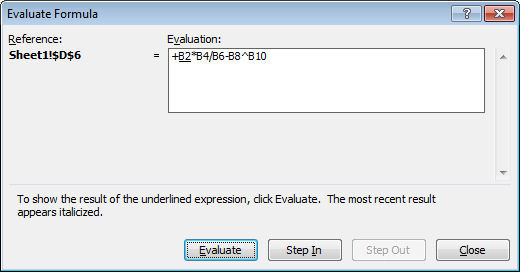
 If you are having difficulty understanding how a formula is calculating in Excel – perhaps because it appears to give you the wrong results – you can step through it to see how it is working.
To do this, select the cell containing the formula and choose Tools > Formula Auditing > Evaluate Formula – in Excel 2007 find the Evaluate Formula option on the Formulas tab.
Click Evaluate and each time you do this, a portion of the formula will be evaluated and you can see it at work.
Use the Step In and Step Out options to see the actual values in place of any appropriate cell references.
This step by step processing should show you what is happening in your formula allowing you to troubleshoot any difficulties with it.
Hi Helen, I’m very interested in learning Excel but not sure from where to start.could you please spare some time for guiding me towards the best way & steps.
i’ll be thankful to you for this act of consideration
All the best in everythin you do
Why do these two formulas return the same result:
in col L =IF(E3:E133=”*VISAMM*”,G20,F20)
where col E has the text string, col M should be false or blank
in col M =IF(E3:E133=”*VISATB*”,G20,F20)
where col E has the text string, col L should be false or blank
If I reverse the Value if TRUE or FALSE cells I get 0.00
I get a return of col F for both IF Statements
I want to return col F as true when the text string is satisfied in the range.
Thanks,Mark
Additional Tip:
If you select PART of a formula, by click&dragging within the formula itself, then you can press F9 to calculate ONLY that part of the formula. Verrrry useful.