


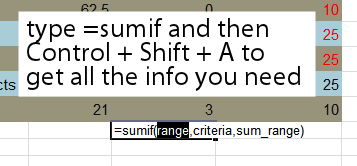
Ok.. so you want to use an Excel formula and you know it is, say, SUMIF that you want to use, but what data does it need and where?
Before you go searching through help or cranking up your browser, let Excel do the work for you. Just type =SUMIF in a cell and press Control + Shift + A and Excel will give you the list of data required. It’s dead simple and it saves heaps of time.
Thank you very much for sharing this wonderful information. I will share this via http://www.loksewaexam.com
Thank you
Nice — I didn’t know that one. (Works in v2007 too)
You can also type SUMIF( and click on the little “fx” button immediately to the left of the formula entry bar. Slightly different outcome: this pops up a sort of Prompt-plus-Tips miniwindow.