


For many years now Microsoft has made it hard for new users to control inserted images in their documents.
Unfortunately, Word 2010 is no exception and, by default, images are inserted into a new Word document as inline images. This means that they cannot be moved or easily positioned on the page without you needing to first change the image’s wrap settings.
This leaves hapless new users with absolutely no clue that this feature is available or needed much less where to find and set it.
To change the way that images are inserted into Microsoft Word documents to make it a one-step process that never needs to be tweaked, in Word 2010 choose File > Options and select the Advanced tab. Locate the Cut, Copy and Paste options and set the Insert/Paste Pictures As setting to Square, Tight, Behind Text, In Front Of Text, Through or Top And Bottom – in fact anything other than the default Inline With Text.
Once you’ve done this, when you insert an image into a document it will be inserted with the setting that you determined. This makes it easy to move the image around the screen and position it exactly where you want it to be.
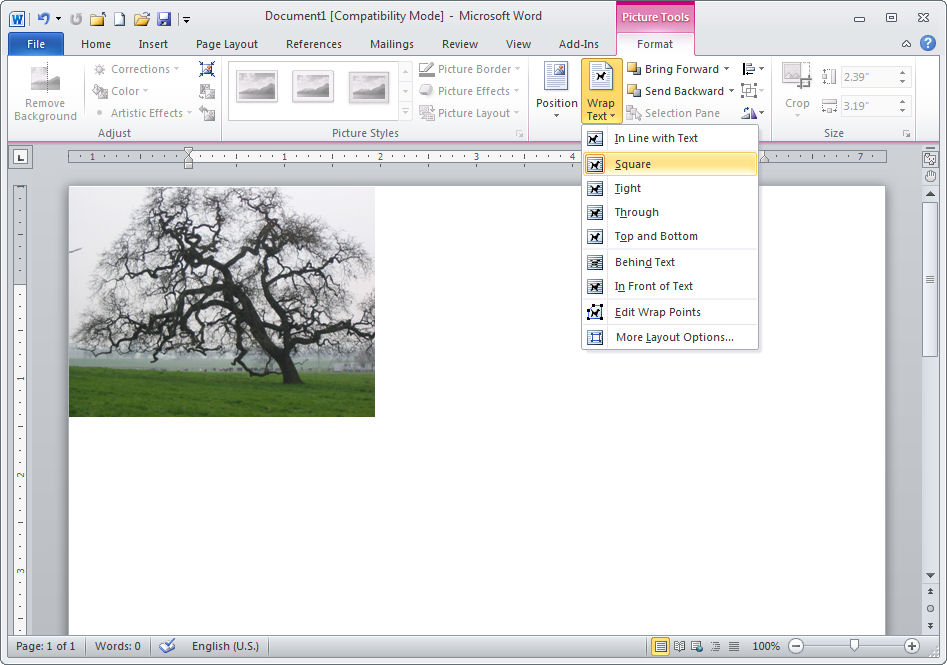
If you have images in your document and if you need to change their wrapping so that you can work with them, click the image, click Picture Tools > Format and from the Wrap Text dropdown list, select Square or another setting (other than Inline with Text).
Microsoft, this default setting earns you a score of -10 it’s not the typically required setting and it doesn’t make good sense as a default.
Thank you so much for this tip! I’ve struggling with this for days!
Great tip! Thanks for this information. Microsoft seems to go out of their way to create unintuitive interfaces!
Thank god, I’ve been trying to figure out how to insert a pdf into the appendix of a word doc for hours and as it’s multipage, i have to copy it page by page and insert by pasting the image for each page….grrr….unless anyone knows a better way to do this…i have to do it all the time!
Lessia
Whey not try Zamzar.com to convert the pdf to the Word .doc format so you can insert it all at once?
Helen
The problem I’m having is that Word 2010 insists on inserting the image at 85% of the original size, and I don’t know how to change the settings so that the images will insert at 100%. I have resampled the images to fit into a specific space, and want to avoid having to resize in Word. Any suggestions?? Thanks!
I wonder if you are trying to make an image bigger than the available space on the page? If so, I believe Word will scale it down so it fits between the margins. You will either need to scale it up manually or craeat a page with smaller or no margins. Or you could create a macro that sizes the image not 100% so you can click the image then run the macro.
I need to insert about 50 pictures into my Word 2010 document. I am afraid this will significantly increase the file size. I need to email the document to other co-workers. Will this be a problem?
Andrea, yes the pictures will adversely affect the file size. I have posted a new post just for you on how to compress the images so that your file size won’t blow out uncontrollably. Here is the link: http://projectwoman.com/2011/11/save-space-compress-your-images-in-word.html
cheers
Helen
You deserve a medal. I’ve been struggling with this problem for years. Thank you for posting!
I’m converting a document I made elsewhere, and can’t work out how to put graphics in the left margin of an indented paragraph: here’s a link to a picture. Any tips would be welcome!
http://db.tt/P9cJWkoZ
You need to set the image with the Square or Tight wrap and then provided the paragraph is indented the image should sit in place. I’ve tried it and it works just fine. Just make sure the image isn’t too close to your number – it needs some breathing space around it. Helen
I find your articles interesting and informative, so thank you! Any advice on master documents in word 2010? I’ve created one and am struggling to see some of the images. Some display just fine and others don’t display at all. I have no idea why. The picture placeholders have no obvious differences. I thought it might be a memory issue, but the files aren’t enormous and I’ve ompressed the images anyway in all my files. Any tipos would be most welcome.
Hi there !
Any advice would be appreciated.
I am self-pub a meteorology text.
There is much black and white line artwork
(diagrams) which printer requires to be GIF.
The scanned jpeg size is fine but when I
convert to GIF and insert into the Word 2010 doc the image is far too big. Resizing the original jpeg in a graphics package to a GIF of the correct size destroys the quality of the inserted image. Have tried various other solutions without success.
Many thanks.
I would certainly like to know how to keep Wrod from reducing the image size (PDF page size) of PDFs that are inserted in front of or inline with text.
How simple! Thank you!
Stephen – from my experience, I’d suggest you patiently redraw a representative diagram, save it as .gif, place in your document at 100% and see what happens. The route from scanned jpg to gif sounds guaranteed to produce low-quality output; remember that in general, straight lines (characteristic in diagrams) don’t work well in .jpg format.
Thanks so much!! I’ve been fighting with a macro to indent text and insert an image, and the image is always inline with the text!! This helped save me a formatting step!
Hi, I wonder if you can help? Why are my pictures getting cropped at the bottom when I put them in a text box, when I display the whole document at 70 percent or below it reappear. I am using word 2010
I’m a seasoned user of MS Word – over twenty years now and this on foxed me. Thanks
Note that if you do choose other than inline positioning in Word 2010, you can no longer see the field code for linked images (i.e. with the Alt-F9 toggle). This is particularly irritating if you later want to change the image path because the field code is only accessible if you reset the wrapping to inline.
Thank you, thank you, thank you. Your advise on how to change default format on inserted photos will save me thousands of keystrokes! Any advise on changing default size of photos inserted into Word? Also I’d like to change the default format for inserted text boxes. Thank you sooooooooo much!
Thank you…thank you…finally de-mystified a task that I was struggling with for days!!!!
yeah! tnx on this one.. really learned so much from this.. more power!
Thanks for very much for this. I have written my biography in old WORD, and it now needs updating. The photographs moved around so infuriatingly, that I eventually had to resort to Publisher. Do I understand from what you say that if I follow your tip, the photos wont move (or even spread over 2 pages as some did)unless I move them myself
No Tom, they still might move. Word 2013 is better than previous versions but they still jump around a bit. These tips might help you a bit but generally for a lot of images, Publisher is the preferred option.
Tom WS: You can get a lot more control by using options in the Layout dialog. Right-click the picture and choose the “Size and Position…” flyout to bring up the dialog box. The Position tab gives you many options for specifying the horizontal and vertical alignment, and allows you to modify options related to the anchor point. The default settings seldom do what I want, so I almost always make changes in this tab.
Keep in mind that by default, an image moves if the anchor point moves. If you turn off that setting AND specify some hor & vert settings, your image is far less likely to move. (It will move to the next page if an edit causes the anchor point to move to the next page.)
So, for example, if you want your picture to be located in the upper right corner of the text area, you might use Horizontal Alignment=Right & relative to=Margin; Vertical Alignment=Top & relative to=Margin; and with the “Move object with text” Option turned off. With these settings, the image will stay in the upper right corner even if edits cause the anchor point to move.
The book layout options are very handy because they can be used to ensure that images stay on the outside (or inside) margins on facing pages. Without these settings, you could not reliably know if a given page would end up being odd or even.
With the appropriate Layout dialog box settings, I do not have problems with text flow disrupting the positions of inserted objects in even quite complex documents. My one beef is that there is no way to insert a full-page image that lets text flow “past” it.
Dear Helen,
What a good tutorial.Thank you very much.
Do you know of any way that I can fix the maximum width or height of an image I paste in. I am making handouts for my students. At the moment the image fills the width of a page by default, and so I only get 1 image per page unless I manually size each image down to 4 inches high or 5 inches wide (then I get 2 images a page).
So, can I somehow format my document so that when I paste the image in it forces the width to a maxumum of say 4 1/2 inches?
Another way might be if I could select several images at once and set the width for all of them at the same time. Is that possible?
Thanks again,
Graham
I am so pleased to read your advice about setting the Advanced Paste to Square instead of Inline. Just what I needed to know. And it was a Microsoft Help search which brought me to your page to find this out!
Many thanks! I have yet to understand with the obviously intelligent people at MS continue to do things like this. If if weren’t for the people I have to share docs with I am ready to choose OpenOffice with all its idiosyncrasies over the frustration from Seatle!
Graham: Consider creating a table and setting the Properties with the preferred width you want (say 5″) and with the “Automatically resize to fit contents” option checked off in the Table Options dialog. When you then insert a picture into the table it will resize proportionally to the width dimension.
I often create several different sized 1 column x 2 row tables for this, and save them each as named Autotext entries (after turning off borders and adjusting cell spacing options as needed). For each, the top row can hold the picture and the bottom the caption. I can also set the text wrapping to flow around the table and set it right, left or centered on the page.
Thank you so much for this tip.
I’ve been trying to create a flyer for my brother’s power washing service and I couldn’t figure out how to place the image in between the text the way that I envisioned it.
You are a lifesaver!
Thank you thank you thank you thank you.
Thank you so much!! Struggling for hours!!!
Thanks! Works way better than playing with background settings.
Its very helpful, works great.
Finally after struggling, Erin’s comments from 10/31/12 helped, but I still couldn’t add a page break at the end of the page without the picture anchoring to the next page, giving me a blank page for the 1st page. I clicked on the Show/Hide button on the Home tab, and then found the anchor. If the anchor is not locked, per the Size & Position menu, you can see the anchor when the Show button is displayed. Move the anchor to just underneath the picture and then on the last paragraph character on the page you can create a page break. This will keep the picture on Page 1 and allow you to start fresh with page 2.
The gift that keeps on giving! 4 years since you posted this, it’s still making people’s day go easier smile. Thanks so much, keen to read the rest of your blog. Thanks so much Helen.
Thanks! I’ve struggled with this for years. Just knowing that the default is stupid (typically MS, that) and changing to top and bottom just fixed it.
Many Thanks!
Thankyou so much for this tip! I’ve struggling with this for days!
Problem solved at last! Very easy instructions. Thank you!
Thank you so much for this Helen. I’ve been struggling with Word 2010 since it came out. Nothing is intuitive with Microsoft programs.
Awesome post. Thanks for taking the time!